
Scan Me? Maybe Don't. QR Code Phishing Is Having a Moment
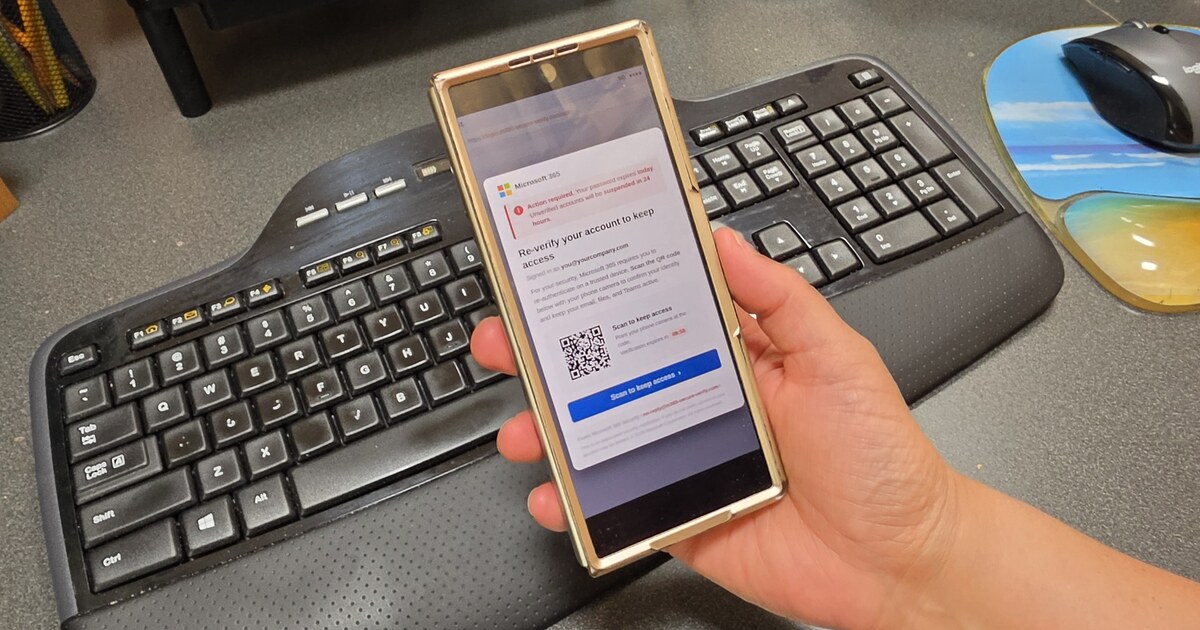
QR codes are everywhere now. Restaurant menus. Parking meters. Event tickets. Boxes. Flyers. The little square has trained all of us to do the same thing without thinking:
Point phone. Scan. Tap. Move on.
Scammers noticed.
And lately, they're putting QR codes in work emails and documents because they know something important: when you scan a code with your phone, you often leave the protections of your work computer behind.
Microsoft reported that QR-code phishing jumped sharply in early 2026 — from 7.6 million observed attacks in January to 18.7 million in March. Most of them arrived hidden inside PDF attachments.
That doesn't mean you should become afraid of every QR code in Albuquerque.
It means your "scan first, think later" habit needs an update.
What does a QR phishing email actually look like?
Usually, it doesn't look like a movie hacker trying to steal your password.
It looks boring.
That's why it works.
You may see something like:
- "Your Microsoft 365 password expires today. Scan to keep access."
- "Secure document waiting. Scan to review."
- "Voicemail received. Scan to listen."
- "Payroll/W-2 document available."
- "Your account needs verification."
Sometimes the QR code is right in the email. Sometimes it's inside a PDF or Word document.
The goal is to move the conversation from your computer to your phone, get you to a convincing sign-in page, and let urgency do the rest.
The sneaky part: the website can look completely normal
This is where people get tripped up.
A phishing page doesn't need flashing red letters that say I AM A SCAM.
It may have a Microsoft logo. Your email address may already be filled in. It may even send you through a legitimate Microsoft sign-in step before things go sideways.
The question isn't just:
"Does this page look real?"
A better question is:
"Why am I being asked to do this in the first place?"
If you weren't expecting to sign in, connect a device, review a file, or re-enter your credentials, stop for a moment.
That 10-second pause is free security software.
My ten-second QR code rule
Before you scan a QR code from an email, ask three things:
1. Was I expecting this?
A document you asked someone to send is different from a random "urgent account notice."
Unexpected + urgent should immediately slow you down.
2. Can I get there another way?
If the email says your Microsoft 365 account has a problem, don't use the QR code.
Open Microsoft 365 the way you normally do.
If it says a vendor has a new invoice, go to the vendor's normal website or call the person you already work with.
The safest link is often the one you already know.
3. What is it asking me to approve?
If scanning a code suddenly asks you to:
- enter a password,
- approve MFA,
- enter a device code,
- grant an app access,
- or "verify" your account,
stop and make sure you understand exactly what you're authorizing.
MFA is a lock. Don't hand someone the key just because the screen looks official.
"I already scanned it." Now what?
First: scanning the code by itself doesn't automatically mean you're compromised.
If you scanned it and something felt wrong, just close it.
If you entered your password, approved an MFA prompt, entered a device code, or granted an app permission, tell whoever manages your IT right away.
Don't wait until tomorrow because you're embarrassed.
Security teams would much rather hear:
"I think I may have clicked something weird."
than:
"So... nobody has been getting my emails for three days."
Fast reporting makes cleanup much easier.
One thing business owners can do this month
Ask one simple question:
If an employee gets a suspicious email, do they know exactly who to contact — and will they actually do it?
You can buy a lot of security technology. You should have good email protection, MFA, safe-link controls, endpoint protection, conditional access, and the rest of the technical layers that fit your environment. That's a big part of what our SecureIT managed protection is built to cover.
But the employee still needs a safe way to raise a hand without feeling like they're admitting they did something stupid.
Make reporting normal.
That's one of the easiest security improvements you can make.
The takeaway
QR codes aren't bad.
Being on autopilot is.
So the next time an email tells you to scan a little square because something is "urgent," give it ten seconds.
Ask why.
Use the route you already trust.
And if something feels weird, say something early.
That's it. No hoodie. No dark room full of computer screens required.
— Michael
Your Friendly Neighborhood Tech Guy
Want a second set of eyes on how your business handles everyday security threats?
Miclyn's Technology & Security Review is a practical conversation about what you have, what matters, and what may be worth fixing — without turning it into a scare session. Start the conversation here.